

Officers in the Student Groups and Departmental Groups at Harvard Griffin GSAS on Engage can submit budget requests for group funding.
Funding applications that require budget requests include the Harvard Griffin GSAS Student Council (GSC), the Community, Culture, and Engagement Fund, and the Student Engagement Fund. You can find the 2026–2027 details on these funds in this article.
How to Submit a Budget Request
Follow the steps below from your group's Engage page.
1. Log in to Engage
Log in to Engage @ Harvard Griffin GSAS.
2. Navigate to your group
Open the Engage page for the Student Group or Departmental Group for which you are submitting the request.
3. Open the back-end Dashboard
From your group's page, go to the group's back-end Dashboard.
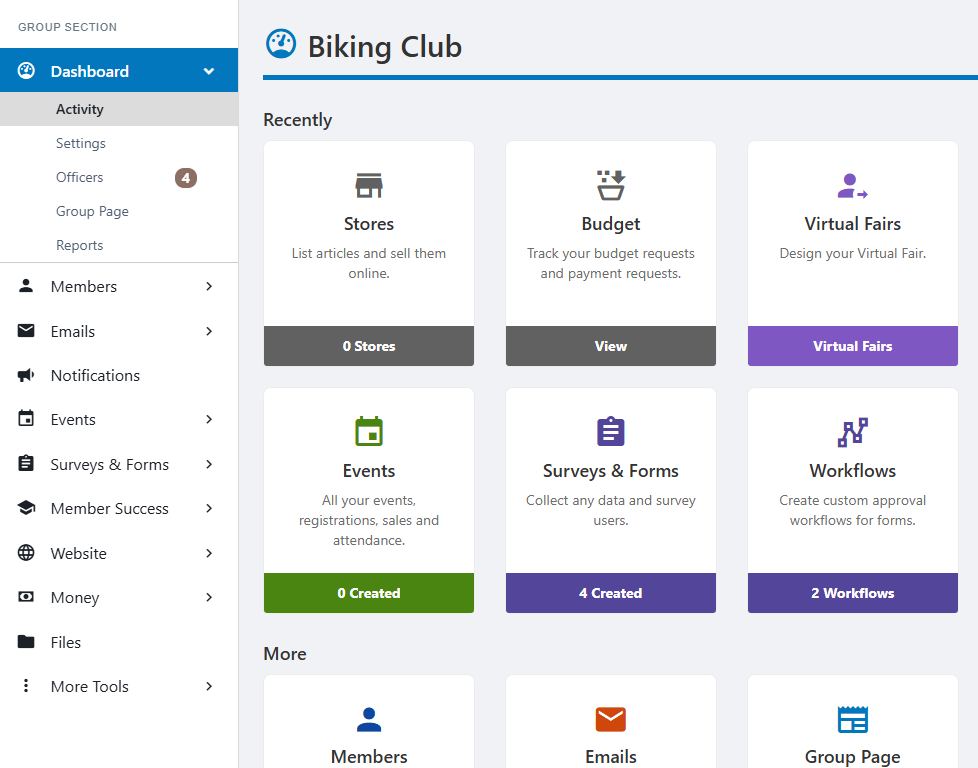
4. Open the Accounting Book
From the Dashboard, go to Money and select Budgeting.
5. Create a new Budget Request
In the Budgeting Window, select GSC Student and Departmental Group Grants on the left and Create Budget Request on the top right.

6. Select GSC Funding and describe your request
Under the available budget-request options, select GSC Funding.
Complete the basic information for the request, including:
- Title: use a short, descriptive name for the event, initiative, or expense.
- Description: briefly explain what the request is for and how the funds will be used.

7. Enter an itemized budget
Add the individual expenses included in your funding request. Your budget should be itemized rather than entered as one lump-sum amount.
For each expense, provide the requested information in Engage and make the description specific enough for reviewers to understand what is being purchased and why it is necessary.
For example, instead of entering only “Event expenses — $500”, separate the request into the relevant individual expenses such as food, supplies, equipment, venue costs, or other applicable items.

8. Complete the GSC supplemental form
Complete the supplemental form associated with the GSC Funding request.
Answer all required questions in the form. The information provided here is used by the GSC when reviewing the funding request, so please provide complete and accurate responses.

9. Review and submit your request
Before submitting, review the request to make sure that:
- the correct funding source is selected;
- the title and description are complete;
- all requested expenses have been entered as an itemized budget;
- the supplemental form has been completed; and
- all other required fields and pages in Engage are complete.
Once everything is complete, submit the budget request through Engage.
Additional Resources
Student Group policies are available in the Harvard Griffin GSAS Student Handbook.
Additional resources for group officers can be found through the Student Group Leader page on Engage.
For technical help using Engage, visit the CampusGroups Help Center.
Questions?
Student Center Team
Lehman Hall
3rd Floor, Office 306
8 Harvard Yard, Cambridge
617-495-2255
stugroups@fas.harvard.edu